The Best Loom Alternative for Mac in 2026: Why Recorder Wins
March 23, 2026—4 min read
Why Recorder is the Best Loom Alternative for Mac in 2026
In the modern era of remote work and digital collaboration, video has become the primary language of communication. For years, Loom has been the go-to for quick video messages. However, as professional needs evolve, many Mac users are finding themselves constrained by browser-based limitations, lack of advanced editing features, and restrictive pricing models.
Enter Recorder—the premium, native Loom alternative designed specifically for the macOS ecosystem. In this guide, we’ll explore why Recorder is the superior choice for professionals who need more power, better performance, and professional-grade editing tools.
The Native Advantage: Why Web-Based Recording Isn't Enough
While browser extensions are convenient, they often struggle with performance. They can lag during high-resolution recordings, fail to capture system audio reliably, and eat up significant system resources.
Recorder is a native Mac application. This means it’s optimized for Apple Silicon (M1/M2/M3 chips), ensuring buttery smooth 4K recordings without taxing your CPU. Whether you're recording a complex software demo or a simple feedback video, Recorder stays out of your way.
Flexible Recording Modes for Every Use Case
One of the biggest frustrations with basic screen recorders is the lack of precision. Recorder offers three distinct recording modes accessible directly from a sleek, minimal overlay:
- Full Display: Capture everything on your screen for comprehensive tutorials.
- Specific Window: Focus on a single app without showing your messy desktop or private notifications.
- Custom Area: Drag and drop to record exactly what matters.
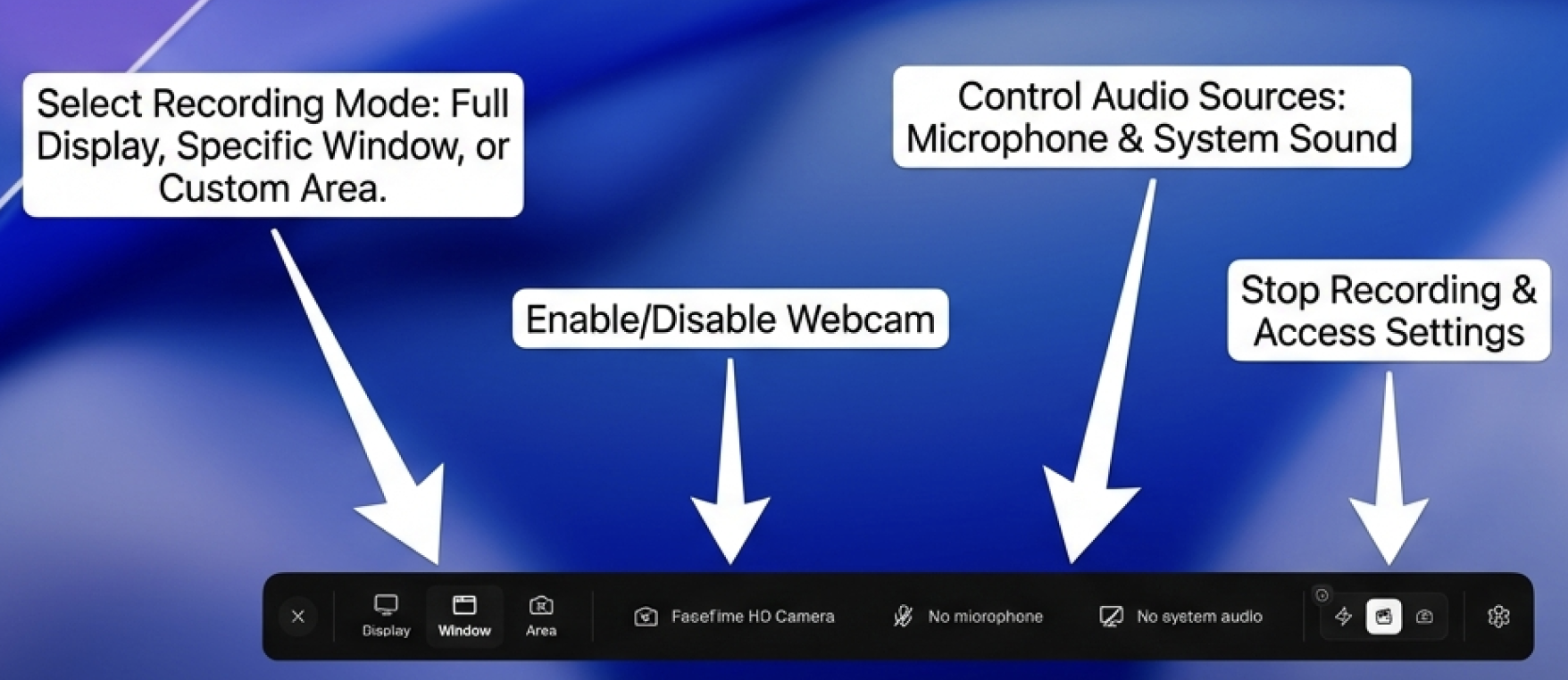 The Recorder interface provides quick access to recording modes, webcam settings, and audio sources.
Professional Audio and Video Control
Clear communication requires clear audio. Recorder gives you granular control over your setup:
- System Audio Capture: Record what’s playing on your Mac (perfect for reviewing video edits or software bugs).
- Microphone Selection: Toggle between your built-in mic or professional XLR setups with a click.
- Webcam Integration: Add a personal touch with a resizable, movable webcam overlay.
From Recording to Masterpiece: The Built-in Studio Editor
This is where Recorder truly leaves Loom in the dust. While Loom offers basic trimming, Recorder includes Studio Mode—a full-featured video editor built right into the app.
 Recorder's Studio Mode allows for professional-grade editing without leaving the app.
In Studio Mode, you can:
- Add Multiple Tracks: Layer voiceovers, background music, and multiple video clips.
- Annotations & Callouts: Highlight key areas of your screen with arrows, text, and highlights.
- AI-Powered Enhancements: Automatically generate transcriptions, captions, and even summaries of your videos.
- Transitions: Smoothly move between different sections of your presentation.
Learn more about Studio Mode here.
Security and Privacy: Your Data, Your Storage
For many enterprises, storing sensitive internal videos on a third-party cloud is a dealbreaker. Recorder solves this by offering Custom S3 Storage Support. You can "Bring Your Own Storage" (BYOS), ensuring that your recordings stay within your organization's infrastructure (AWS, Google Cloud, Azure, etc.).
Comparing the Giants: Loom vs. Recorder
| Feature | Loom | Recorder |
|---|---|---|
| Platform | Browser/Desktop | Native Mac/Windows App |
| Max Resolution | 4K (Paid) | 4K (Standard) |
| Editing | Basic Trimming | Full Multi-track Timeline |
| AI Features | Limited | Transcriptions, Summaries, AI Captions |
| Storage | Loom Cloud Only | Cloud + Custom S3 Support |
| Performance | Resource Intensive | Optimized for macOS |
Ready to Level Up Your Video Communication?
Stop settling for "good enough" recordings. Whether you're a product manager, a developer, or a creative professional, Recorder provides the tools you need to create high-impact video content in seconds.
Download Recorder for Mac today and experience the difference of a tool built for professionals. Check out our pricing plans for teams and individuals.